 Bell Rung
Match the ringing. Then stop, and listen.
Bell Rung is a free iPhone app for people with tinnitus. It plays a tone at the pitch you choose, or a soft noise, then stops and repeats. Some people notice their ringing is quieter for a moment after the sound stops. I’m one of them.

Free, with no ads, accounts, or tracking. For iPhone with iOS 18 or later.
How to use it
It takes a minute to set up. After that, it’s one button.
-
Find your pitch
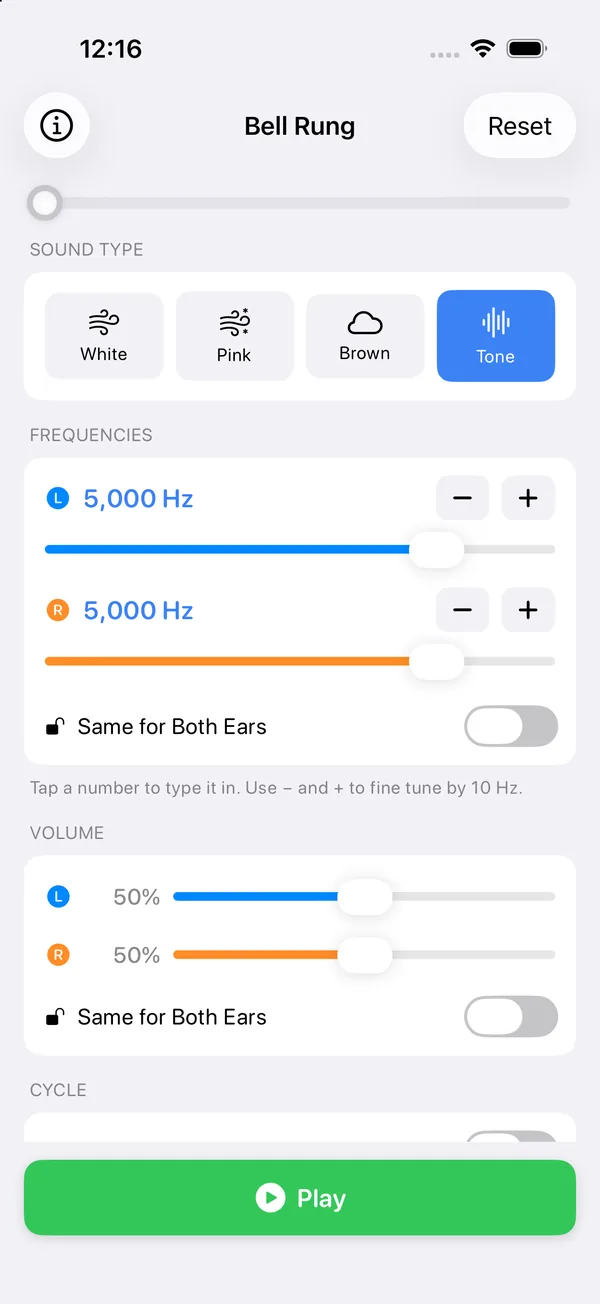
Put on headphones and keep the volume low. Choose Tone, then slide the frequency until it sounds like your ringing. Each ear has its own slider, so left and right can be different.
-
Set the cycle
Choose how long the sound plays and how long it rests, from 1 to 60 seconds each. Turn on Fade if you’d like the sound to ease in and out. Prefer steady sound? Turn on Always On.
-
Press Play and notice the quiet
When the sound stops, pay attention to your ringing. Is it softer? For how long? Adjust the pitch and timing from there.
-
Experiment
Everyone’s tinnitus is different. Try white, pink, or brown noise, other timings, or the optional vibration and flashlight cues.
What’s in the app
- Tone or noise
- A pure tone at any pitch you choose, or white, pink, or brown noise.
- Each ear on its own
- Set a different pitch and volume for your left and right ear, or keep them the same.
- On and off cycle
- The sound plays, then rests, on timings you choose, and repeats until you stop it. Always On gives you steady sound instead.
- Fade New in 2.1
- Eases the sound in and out, so it never starts or stops abruptly.
- Vibration and flashlight cues
- Optional. They run while the sound is on, so you can feel or see the cycle.
- Keeps playing
- Works with your screen locked, and alongside your music or podcasts.
- Nothing leaves your phone
- No sign-up, no ads, no analytics. Your settings stay on your iPhone.
Why this might work
I built Bell Rung because I have tinnitus. I noticed that when I played a tone that matched my ringing and then stopped it, the ringing sometimes went quiet for a few seconds. That small moment felt like relief.
Researchers call this residual inhibition: for some people, tinnitus is briefly quieter after a matching sound ends. It doesn’t happen for everyone, and when it does, it usually lasts from a few seconds to a few minutes. Bell Rung makes it easy to repeat that moment and see what it does for you.
If you’re curious, look up “residual inhibition” or “tinnitus habituation.” I truly hope you find a few moments of quiet.
Jordan
Privacy policy
Last updated October 8, 2026
Bell Rung does not collect, store, or transmit any personal information. Everything the app does happens on your device.
Information we collect
None. The app collects no data.
- No accounts
- No analytics
- No tracking
- No identifiers
Data stored on your device
Your settings, such as frequencies, volumes, timing, fade, and vibration and flashlight preferences, are stored only on your device.
Third-party sharing
Since no data is collected, none is shared.
Children’s privacy
Bell Rung collects nothing from anyone, including children. The app is intended for adults or supervised use.
This website
This website uses no cookies, analytics, or tracking. Like any website, our host keeps basic server logs, such as IP addresses, to run and protect the site.
Changes
If Bell Rung ever adds online features, this policy will be updated first.
Contact
I am not a doctor
Bell Rung is not a medical device, and nothing here is medical advice. Results vary widely. Some people notice brief quiet, some notice nothing, and some find certain sounds uncomfortable.
Please be safe
- Keep the volume low.
- Stop right away if anything feels uncomfortable.
- See a doctor or audiologist about your tinnitus. Get checked promptly if it started suddenly, is in one ear only, pulses with your heartbeat, or comes with hearing loss or dizziness.
Use at your own risk
Bell Rung and this website are free and provided “as is,” without warranties of any kind. You choose the sounds, the volume, and how long you listen, and you use the app at your own risk.
To the fullest extent the law allows, Jordan Lewis and SimutekPro are not liable for any harm, loss, or damage that comes from using Bell Rung or this website, including any effect on your hearing or tinnitus. If the law where you live doesn’t allow some of these limits, they apply as far as it does.
Your use of the app is also covered by Apple’s Standard License Agreement, which includes its own warranty and liability terms.
Bell Rung is simply a tool to experiment with sound. Wishing you peace, even if just for a moment.
Support
Bell Rung is free. If it gave you a moment of quiet and you’d like to help keep it going, you can buy me a coffee.
Buy me a coffee on Ko-fiQuestions, bugs, or ideas? Email makeitstop@iamnota.doctor.